Chrome Web Store Ownership Transfer: A Step-by-Step Guide
Moving an extension to a new owner is the part of a sale that goes wrong most often. Here is the order the steps have to happen in, what breaks when you get it wrong, and how to protect both sides.
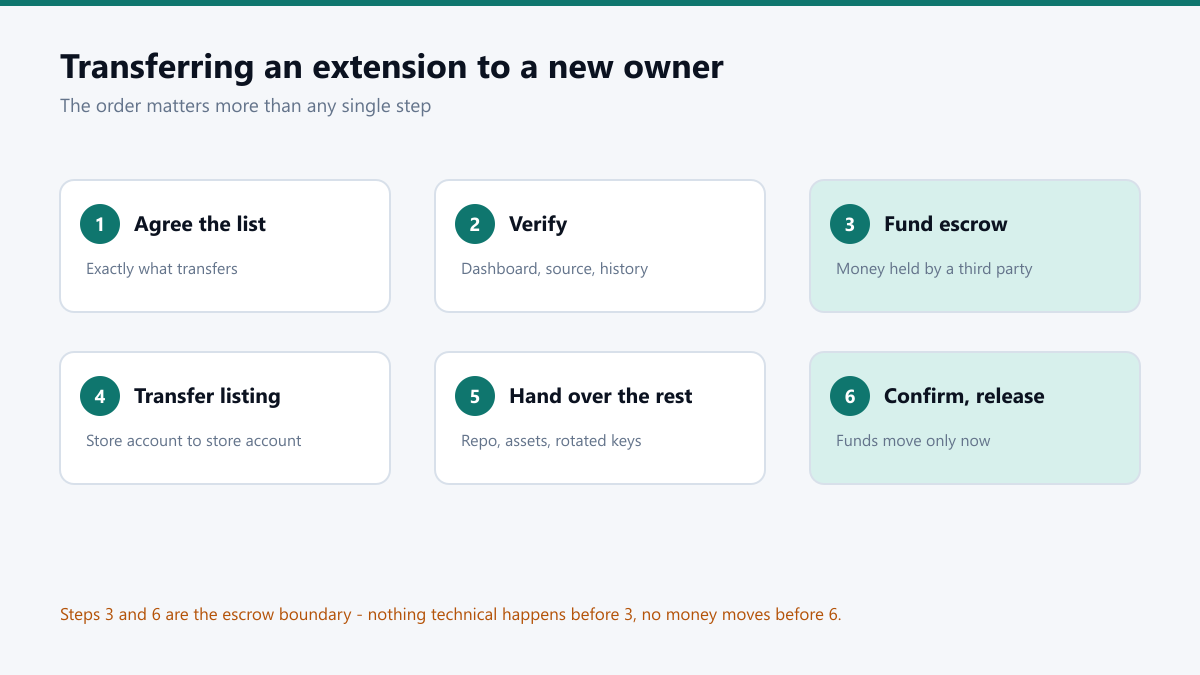
Agreeing a price is the easy half. The transfer is where deals actually fall apart, and almost always for the same reason: the two sides do the steps in the wrong order, and one of them ends up holding nothing.
This is the sequence that works. It is deliberately slow in the middle and fast at the end.
1. Agree what is actually being transferred
Write it down before anything moves. “The extension” is not a specification. A complete handover usually includes rather more than the buyer first assumes:
| Asset | Why it matters | Often forgotten |
|---|---|---|
| Source repository | Without build history, the buyer cannot ship an update | No |
| Store listing ownership | The users live here, not in the code | No |
| Store assets | Icons, screenshots, promo tiles in editable form | Yes |
| Locale files | Rebuilding 40 translations costs real money | Yes |
| Backend and API keys | The extension silently dies without them | Yes |
| Privacy policy URL | Store compliance breaks the moment it 404s | Yes |
| Analytics history | The buyer needs a baseline to know if they broke something | Yes |
2. Let the buyer verify before money moves
A serious buyer will want to see the source, look at the developer dashboard, and check the analytics. This is not an insult and it should not be treated as one. A seller who refuses reasonable diligence is telling you something.
A screen share is usually enough for the dashboard. For the code, a read-only repository invitation scoped to the buyer works well – they can read every line without being able to take a copy before payment.
3. Open escrow, and only then start the technical work
This is the pivot point of the whole process. The buyer funds escrow; the escrow provider confirms it holds the money; the seller begins the transfer. Neither side is exposed: the buyer’s money is not with the seller, and the seller is not handing over assets on a promise.
Doing the technical work first, on trust, is how sellers end up transferring a store listing to someone who then stops replying.
4. Transfer the store listing
Every store handles this differently and the differences matter.
On the Chrome Web Store, transfer runs through the developer dashboard’s account transfer flow. The receiving account must be a registered developer with the one-off fee already paid, and it must have two-factor authentication enabled. Sort both out before the day of the transfer, not during it.
On Microsoft Edge Add-ons, the practical route is usually a Partner Center account or ownership change rather than a per-extension transfer, so plan for that structural difference early.
On Firefox, add-on ownership moves by adding the new account as an author and then removing the old one. It is the simplest of the three, and the one people most often forget to complete – leaving the seller still attached as an author months later.
5. Hand over everything else
Repository ownership, domain, backend, keys, documentation. Rotate every credential rather than sharing the existing ones. Any secret the seller has ever seen should be replaced, not passed along – this protects the seller as much as the buyer.
6. Confirm, then release
The buyer confirms they have working access to everything on the list from step one. Only then does escrow release. If something is missing, it gets fixed before release, not after – after release there is no leverage left.
The part nobody enjoys discussing
Extension transfers have a bad reputation in some quarters, and it is earned. There is a well-documented pattern of buyers acquiring extensions with established user bases and then pushing an update that injects advertising, tracking or worse into a trusting audience.
Both sides have an interest in not being part of that. As a buyer, expect to be asked what you intend to do with it. As a seller, ask. A buyer with a real plan will answer easily; one who bristles at the question has told you what you needed to know.
How long does a transfer take end to end?
Realistically three to ten days. The store-side transfer itself is quick once both accounts are ready, but developer account registration, two-factor setup and escrow funding all add a day here and there.
Do users notice when an extension changes hands?
Not directly – there is no notification. What they notice is what changes afterwards. Keeping the first few updates boring is the cheapest way to protect the rating you just paid for.
Can the extension keep updating during the transfer?
It can, but it is better if it does not. An update sitting in review while ownership changes is an easy way to end up with a rejected submission attached to an account that no longer controls the listing.
What if the store refuses the transfer?
This is exactly what escrow is for. If the transfer cannot complete for a reason outside the buyer’s control, the funds have not been released and the escrow provider handles the return. Never let a store rejection find you after the money has already moved.
Keep reading
4 min read
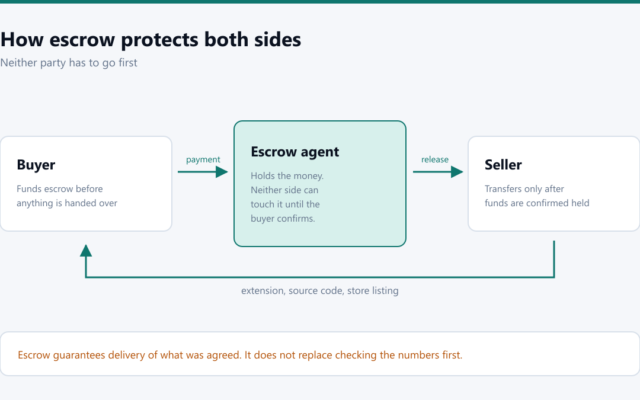
Buying a Browser Extension Safely: How Escrow Protects Both Sides
In a browser extension sale neither side can go first without exposure. Escrow removes that problem entirely, and understanding how it works is what separates a clean deal from a bad story.
5 min read
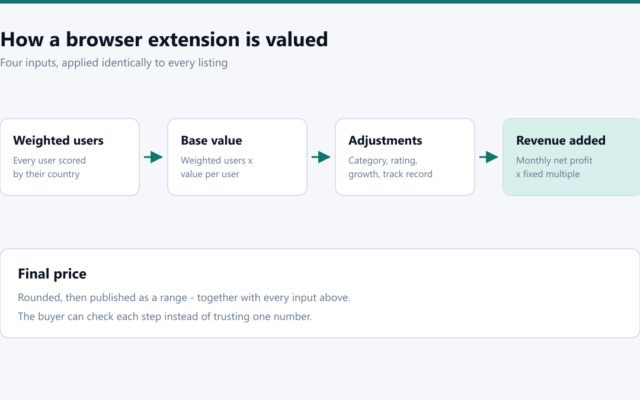
How to Value a Browser Extension: A Data-Driven Framework
Install counts alone tell you almost nothing. Here is the framework I use to value a browser extension, from weighting users by country to deciding what a revenue multiple should actually be.
4 min read
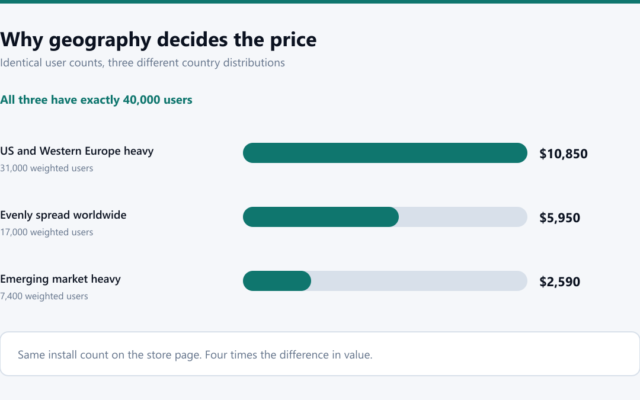
Why User Geography Decides What a Browser Extension Is Worth
Two extensions with identical install counts can differ fourfold in value. The variable that explains most of that gap is which countries the users are in, and it is measurable.